
The work that kept waiting
Documenting a client's mobile apps kept getting pushed for more urgent work. Here's how AI agents got it done with about a week of my time.
Ask three sources what a mobile app does and you might get three different answers. The design files say one thing, the documentation says another, and the app on your phone does something else.
That’s where a client’s iOS and Android apps were this fall. A long integration project had the team’s attention, and while it did, the apps kept changing. Some screens followed one design system and some followed another.
Everyone could see that a full record of the apps, built from the apps themselves, mattered. But it’s the kind of work that never gets urgent. Doing it by hand would have pulled people off the same backlog it was meant to help sort out, and that backlog was full of things customers would notice sooner. So it kept waiting.
My call was that it had waited long enough, and that it didn’t have to come out of the team’s time. I directed AI agents to carry the volume, with about a week of my own time spread across 30 days, most of it running in the background. The team ended up with three things it didn’t have before: a record of how the apps work today, a list of where they fall short, and a way forward for nearly every one of those problems, including all of the serious ones.
What I took from it: when an important job keeps getting pushed, it’s worth asking whether AI can handle the volume while you keep the judgment. Here’s where my judgment went.
Set the guardrails before anything runs
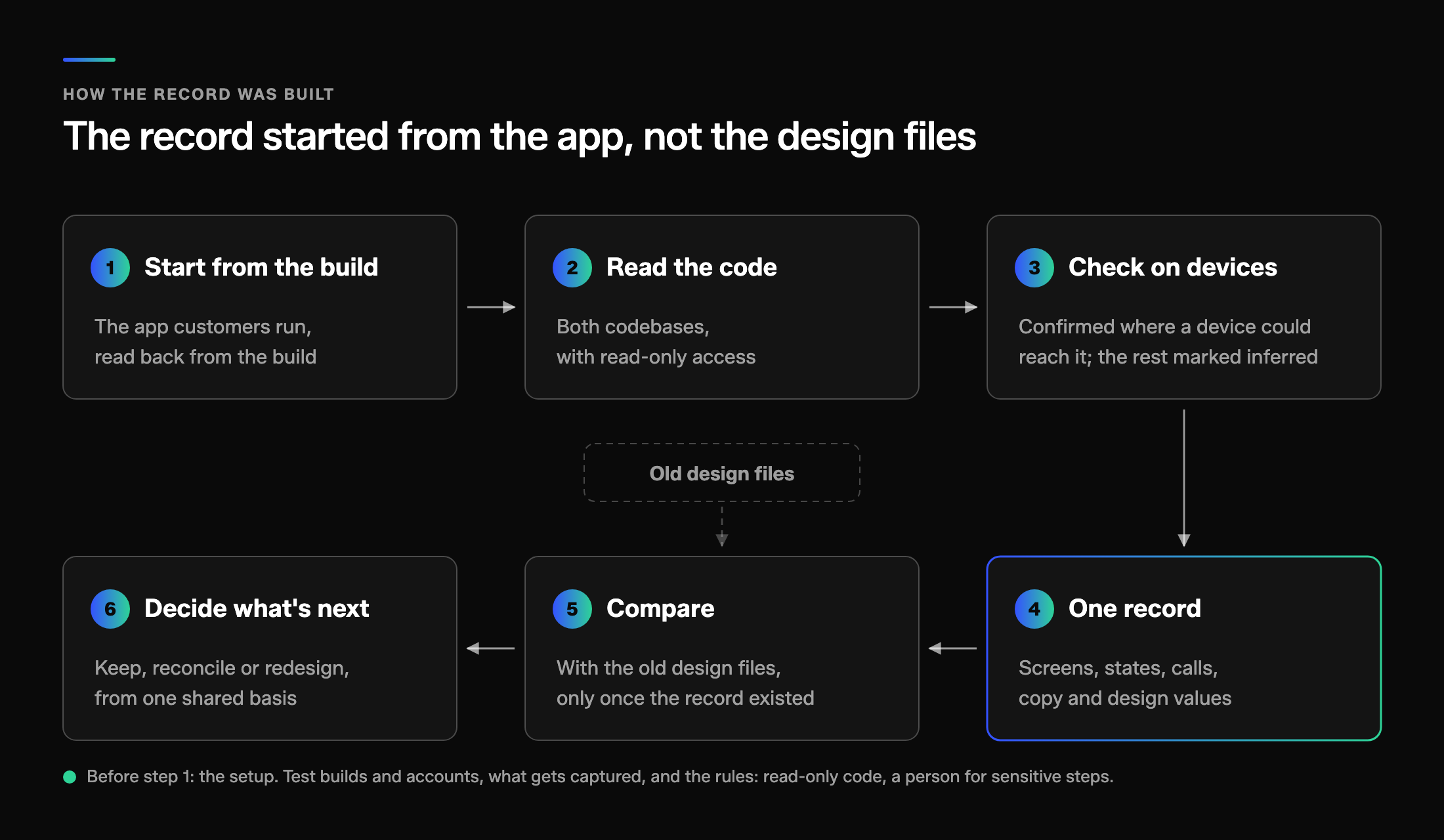
Before any agent touched the work, I set the boundaries. It followed our agency’s AI policy, the code was read-only, I handled sensitive steps like signing in myself, and nothing that changed data on the test servers ran until the project manager signed off.
Those rules are what made it safe to let the work run in the background. With them settled, my setup time went into making sure the work captured as much as possible, because anything it missed wouldn’t show up in the record.
Decide what counts as evidence
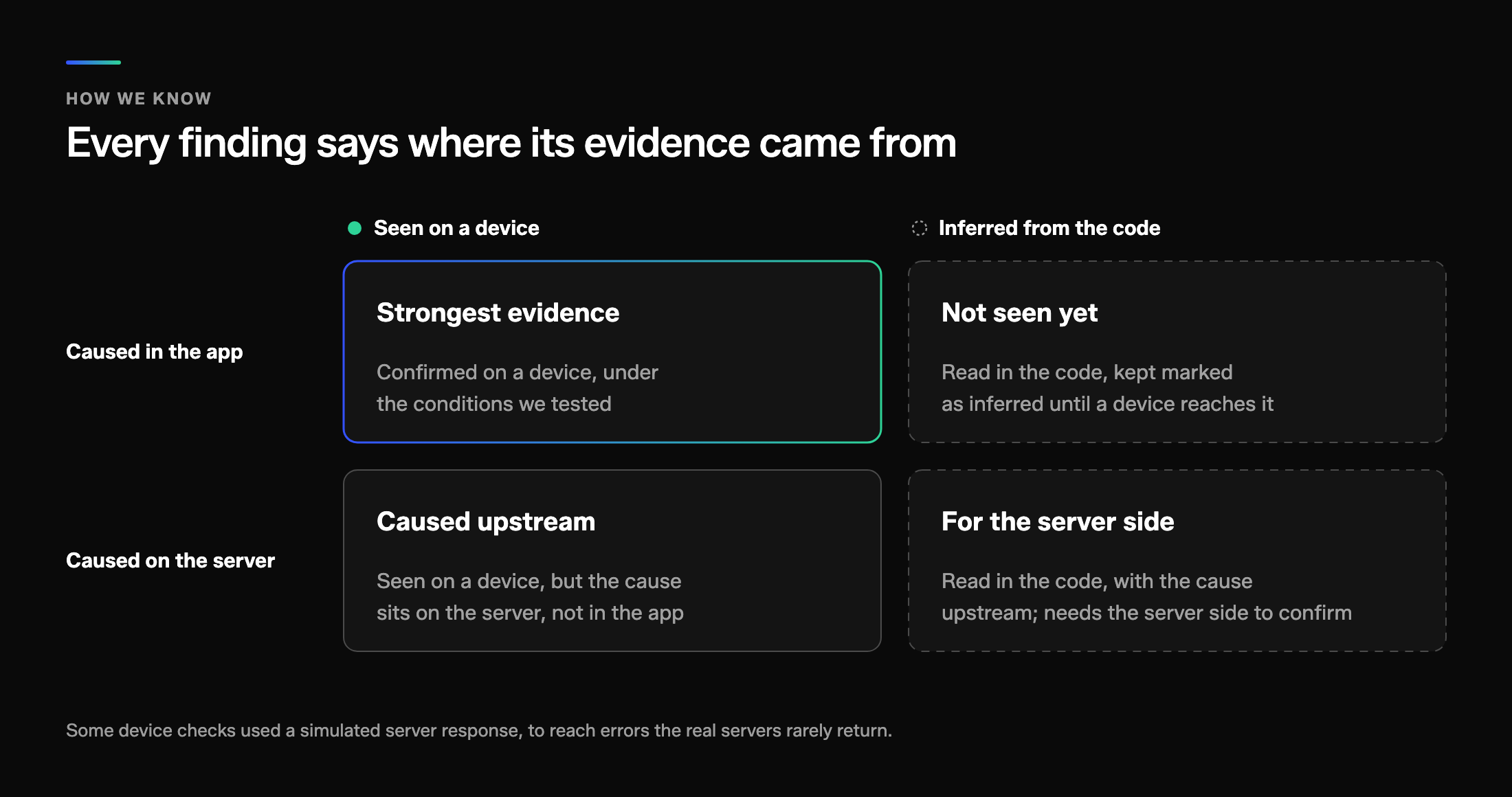
A record is only useful if the team can trust it, so I set the standard for evidence up front. Every finding answers two questions: did we see it on a device or infer it from the code, and is the cause in the app or on the server? Anything inferred got checked on a device wherever a device could reach it, and whatever couldn’t be checked stays marked as inferred. There was no user research, so the record describes how the apps behave, not how people feel using them.
That standard was useful right away. The first pass read only the code, and it missed problems that only show up when people use an app the way they normally do, like getting interrupted halfway through a task. Checking on devices caught them. That’s why “seen on a device” counts for the most, with one caveat: it covers the conditions we tested, not every possible condition.
Edit for the people who’ll use it
Left to itself, AI has a tendency to overbuild. A first pass shows you everything it found, with another layer, another document, another level of detail, and it doesn’t curate any of it for the people who have to use it. A lot of my time went into pulling that back, so the record says something a developer or designer can pick up and use.
That editing stayed with me. The agents can produce the volume, but someone has to decide what the people using it need and cut the rest.
Turn the record into decisions
What I cared about was what the team could decide with the record.
The places the apps fall short are ranked, from the ones that stop someone finishing a task down to polish, and nearly every one has a fix or a design task. They’re sorted into what can go in the next release, what needs design or a decision first, and what’s structural. It’s the start of a roadmap, and the team is planning from it now.
The design values in use became the as-built design system, documented in code and in Figma. The team does have a documented design system, but over the years the apps drifted away from it a screen at a time. Now we can audit what’s live against what the system says it should be and decide what to bring back in line. And instead of reconciling three sources, everyone works from one.
Ask again about the job that keeps waiting
AI didn’t make any of those calls. It handled the reading, the capturing and the cross-checking. I set the guardrails, decided what counted as evidence, edited for the people who’d use it and decided what needed a second look.
So if your team has an important job that keeps getting pushed, it’s worth asking again whether it’s really too big. It might only be a week of setup and judgment away from done.